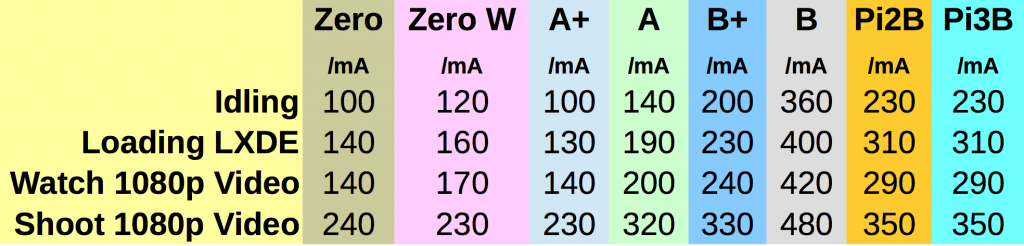
由圖可知 A+ 最優, 略勝 Pi Zero, 因為 A+ 沒有內建 WiFi, 功耗當然較少. 這些板子只有 A 與 Pi 2 我沒買, 原先蠻喜歡 A+ 的, 但 Pi Zero 出來後就被取代了, Pi Zero W 更優, 空載時僅耗 0.6W, 全速運作也低於 1.25W. 雖然 Pi 3 效能較高, 但體積重量都大, 我覺得還是 Pi Zero W 最適合做飛控電腦.
其中可有可無的第二參數 data 是要傳送給伺服器的資料字串, 如果有傳送 data 的話就用 POST 方法提出請求; 否則就是用 GET 方法. urlopen() 方法會傳回一個 socket 物件, 這樣就可以用 socket() 物件的 read() 方法來讀取 HTTP 回應內容, 例如讀取 MicroPython 測試網頁 :
>>> import urllib.urequest as u
>>> s=u.urlopen('http://micropython.org/ks/test.html') #以 GET 方法提出請求
>>> type(s)
<class 'socket'> #傳回值是 socket 物件
>>> s
<socket state=3 timeout=-1 incoming=3fffa058 off=0>
>>> s.status #沒有實作 HTTP 回應狀態碼
Traceback (most recent call last):
File "<stdin>", line 1, in <module>
AttributeError: 'socket' object has no attribute 'status'
>>> s.getheader('Content-Type') #沒有實作 getheader()
Traceback (most recent call last):
File "<stdin>", line 1, in <module>
AttributeError: 'socket' object has no attribute 'getheader'
>>> s.getheaders() #沒有實作 getheaders()
Traceback (most recent call last):
File "<stdin>", line 1, in <module>
AttributeError: 'socket' object has no attribute 'getheaders'
>>> r=s.read() #讀取 TCP 串流緩衝區 (傳回 bytes 型態)
>>> s
<socket state=3 timeout=-1 incoming=0 off=0> #讀取過後 incoming 歸零
>>> type(r)
<class 'bytes'> #傳回 bytes 型態
>>> r #二進位 (byte) 資料 b'<!DOCTYPE html>\n<html lang="en">\n <head>\n <title>Test</title>\n </head>\n <body>\n <h1>Test</h1>\n It\'s working if you can read this!\n </body>\n</html>\n'
>>> r=s.read() #讀過之後緩衝區已清空, 再次 read() 無內容
>>> r
b''
上面 socket.read() 傳回的 bytes 串流可以用 decode('utf-8') 方法轉成 utf-8 編碼的字串, 然後再用字串的 split() 方法以 '\n' 為界拆分字串為串列型態, 這樣就可以用 for 迴圈印出 HTML 格式了 :
>>> import urllib.urequest as u
>>> s=u.urlopen('http://micropython.org/ks/test.html')
>>> r=s.read()
>>> r.decode("utf-8")
'<!DOCTYPE html>\n<html lang="en">\n <head>\n <title>Test</title>\n </head>\n <body>\n <h1>Test</h1>\n It\'s working if you can read this!\n </body>\n</html>\n'
>>> html=r.decode('utf-8').split('\n')
>>> html
['<!DOCTYPE html>', '<html lang="en">', ' <head>', ' <title>Test</title>', ' </head>', ' <body>', ' <h1>Test</h1>', " It's working if you can read this!", ' </body>', '</html>', '']
>>> for line in html:
... print(line)
...
...
...
<!DOCTYPE html>
<html lang="en">
<head>
<title>Test</title>
</head>
<body>
<h1>Test</h1>
It's working if you can read this!
</body>
</html>
>>>
以上是 urllib.urequest 模組處理 GET 請求的方法, 不過由於 MicroPython 測試網頁只是單純的靜態網頁, 無法測試帶參數的 GET 請求. 測試含有參數的 GET 可以利用 httpbin.org 的主機所提供的服務, 其 GET 測試網址為 :
import urllib.urequest as u
url='http://httpbin.org/get?a=1&b=2'
s=u.urlopen(url)
r=s.read()
lines=r.decode('utf-8').split('\n')
for line in lines:
print(line)
結果如下 :
MicroPython v1.9.1-8-g7213e78d on 2017-06-12; ESP module with ESP8266
Type "help()" for more information.
>>> import urllib.urequest as u
>>> url='http://httpbin.org/get?a=1&b=2'
>>> s=u.urlopen(url)
>>> r=s.read()
>>> r
b'{\n "args": {\n "a": "1", \n "b": "2"\n }, \n "headers": {\n "Connection": "close", \n "Host": "httpbin.org"\n }, \n "origin": "223.138.76.144", \n "url": "http://httpbin.org/get?a=1&b=2"\n}\n'
>>> lines=r.decode('utf-8').split('\n') #格式化
>>> for line in lines:
... print(line)
...
...
...
{
"args": { "a": "1", "b": "2"
},
"headers": {
"Connection": "close",
"Host": "httpbin.org"
},
"origin": "223.138.76.144",
"url": "http://httpbin.org/get?a=1&b=2"
}
import urllib.urequest as u
url='http://httpbin.org/post' data="{'a':'1','b':'2'}"
s=u.urlopen(url,data)
r=s.read()
lines=r.decode('utf-8').split('\n')
for line in lines:
print(line)
結果如下 :
MicroPython v1.9.1-8-g7213e78d on 2017-06-12; ESP module with ESP8266
Type "help()" for more information.
>>> import urllib.urequest as u
>>> url='http://httpbin.org/post'
>>> data="{'a':'1','b':'2'}" #必須是字串
>>> s=u.urlopen(url,data)
>>> r=s.read()
>>> lines=r.decode('utf-8').split('\n')
>>> for line in lines:
... print(line)
...
...
...
{
"args": {}, "data": "{'a':'1','b':'2'}",
"files": {},
"form": {},
"headers": {
"Connection": "close",
"Content-Length": "17",
"Host": "httpbin.org"
},
"json": null,
"origin": "223.198.79.144",
"url": "http://httpbin.org/post"
}
boolean debounced() { //check if debounced
static unsigned long lastMillis=0; //record last millis
unsigned long currentMillis=millis(); //get current elapsed time
if ((currentMillis-lastMillis) > debounceDelay) {
lastMillis=currentMillis; //update lastMillis with currentMillis
return true; //debounced
}
else {return false;} //not debounced
}
監控視窗輸出結果如下 :
running a ...
Interrupted ...
running b ...
Interrupted ...
running c ...
running d ...
Interrupted ...
running a ...
Interrupted ...
running b ...
running c ...
running d ...
running a ...
running b ...
Interrupted ...
running c ...
Interrupted ...
running d ...
>>> s=socket.socket()
>>> s.connect(socket.getaddrinfo("towel.blinkenlights.nl", 23)[0][-1])
>>> data=s.recv(500,0)
Traceback (most recent call last):
File "<stdin>", line 1, in <module>
TypeError: function takes 2 positional arguments but 3 were given
若不用無窮迴圈, 而是手動讀取 Socket 接收緩衝區, 可以看到每次收到的串流 :
>>> data=s.recv(500)
>>> print(data)
b'\x1b[H\x1b[J'
>>> data=s.recv(500)
>>> print(data)
b'\x1b[H\r\n\r\n\r\n\r\n\r\n\r\n \r\n Original Work : Simon Jansen ( http://www.asciimation.co.nz/ ) \r\n Telnetification : Sten Spans ( http://blinkenlights.nl/ ) \r\n Terminal Tricks : Mike Edwards (pf-asciimation@mirkwood.net) \r\n \r\n The hard work was done by Simon and Mike, \r\n I just placed it online in a '
>>> url="http://www.google.com.tw"
>>> _, _, host, path=url.split('/', 3) # 這一行會出錯
Traceback (most recent call last):
File "<stdin>", line 1, in <module>
ValueError: need more than 3 values to unpack
#main.py
import network
import socket
def connect_wifi(ssid, pwd):
wlan=network.WLAN(network.STA_IF)
wlan.active(True)
if not wlan.isconnected():
print('connecting to network ...')
wlan.connect(ssid, pwd)
while not wlan.isconnected():
pass
print('Connected:', wlan.ifconfig())
如果只是要取得伺服器回應的標頭, 可以向伺服器提出 HEAD 請求, 其 HTTP 訊息格式與 GET 一樣, 只要把 GET 改成 HEAD 即可 :
HEAD / HTTP/1.1
伺服器只回應標頭, 而不會傳回資源內容. 我在 main.py 裡面複製 http_get() 為 http_head(), 將其中 GET 改成 HEAD 如下 :
#main.py
import network
import socket
def connect_wifi(ssid, pwd):
wlan=network.WLAN(network.STA_IF)
wlan.active(True)
if not wlan.isconnected():
print('connecting to network ...')
wlan.connect(ssid, pwd)
while not wlan.isconnected():
pass
print('Connected:', wlan.ifconfig())
"A client MUST include a Host header field in all HTTP/1.1 request messages . If the requested URI does not include an Internet host name for the service being requested, then the Host header field MUST be given with an empty value. An HTTP/1.1 proxy MUST ensure that any request message it forwards does contain an appropriate Host header field that identifies the service being requested by the proxy. All Internet-based HTTP/1.1 servers MUST respond with a 400 (Bad Request) status code to any HTTP/1.1 request message which lacks a Host header field."